Instalación y configuración de Alpine Linux
La instalación de Alpine Linux, es un proceso un tanto diferente al de otras distribuciones «amigables».
En este artículo nos centraremos en la instalación de Alpine Linux sobre una máquina virtual.
Imagen ISO
Descarga de la ISO
La descarga de la ISO, se puede realizar accediendo a la siguiente página: https://www.alpinelinux.org/downloads/
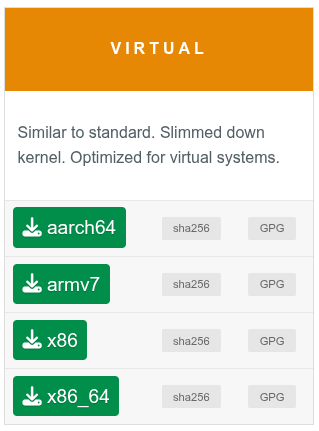
Se dispone de varias opciones de descarga, pero dado que se implementará sobre una máquina virtual, utilizaremos la versión VIRTUAL.
Sistema operativo
Instalación del sistema operativo
Una vez descargada la imagen y mapeada en la máquina virtual, se procederá a iniciar.
Cuando arranque, llegará a un punto donde nos solicitará el login de localhost.
1
2
3
4
5
6
7
8
9
10
11
12
13
14
15
16
17
18
19
20
21
22
23
24
25
26
27
28
29
30
31
32
33
34
35
36
OpenRC 0.63 is starting up Linux 6.18.7-0-virt (x86_64)

 * /proc is already mounted
 * Mounting /run ...                                                         [ ok ]
 * /run/openrc: creating directory
 * /run/lock: creating directory
 * /run/lock: correcting owner
 * Caching service dependencies ...                                          [ ok ]
 * Remounting devtmpfs on /dev ...                                           [ ok ]
 * Mounting /dev/mqueue ...                                                  [ ok ]
 * Mounting modloop ...                                                      [ ok ]
 * Verifying modloop ...                                                     [ ok ]
 * Mounting security filesystem ...                                          [ ok ]
 * Mounting debug filesystem ...                                             [ ok ]
 * Mounting trace filesystem ...                                             [ ok ]
 * Mounting persistent storage (pstore) filesystem ...                       [ ok ]
 * Mounting bpf filesystem ...                                               [ ok ]
 * Starting busybox mdev ...                                                 [ ok ]
 * Scanning hardware for mdev ...                                            [ ok ]
 * Loading hardware drivers ...                                              [ ok ]
 * Loading modules ...                                                       [ ok ]
 * Setting system clock using the hardware clock [UTC] ...                   [ ok ]
 * Checking local filesystems ...                                            [ ok ]
 * Remounting filesystems ...                                                [ ok ]
 * Mounting local filesystems ...                                            [ ok ]
 * Configuring kernel parameters ...                                         [ ok ]
 * Creating user login records ...                                           [ ok ]
 * Cleaning /tmp directory ...                                               [ ok ]
 * Setting hostname to localhost from /etc/hostname ...                      [ ok ]
 * Starting busybox syslog ...                                               [ ok ]
 * Starting firstboot ...                                                    [ ok ]

Welcome to Alpine Linux 3.23
Kernel 6.18.7-0-virt on x86_64 (/dev/tty1)

localhost login: _
Nos logearemos como root.
Una vez autenticado, ejecutaremos el siguiente comando.
1
setup-apline
1
2
3
4
5
6
7
8
9
10
11
12
13
localhost:~# setup-alpine

ALPINE LINUX INSTALL
--------------------

Keymap
------
af   al   am   ara  at   az   ba   bd   be   bg   br   brai by   ca   ch   cm   cn   cz   de   dk   dz   ee   epo  es   fi   fo
fr   gb   ge   gh   gr   hr   hu   id   ie   il   in   iq   ir   is   it   jp   ke   kg   kr   kz   la   latam lk   lt   lu   ma
md   me   mk   ml   mm   mt   my   ng   nl   no   nz   ph   pk   pl   pt   ro   rs   ru   se   si   sk   sy   th   tj   tm   tr
tu   ua   us   uz   vn

Select keyboard layout: [none] _
Seleccionaremos el layout del teclado.
1
2
3
4
5
6
* Caching service dependencies ...                                         [ ok ]
* Setting keymap ...                                                       [ ok ]

Hostname
--------
Enter system hostname (fully qualified form, e.g. 'foo.example.org') [localhost] _
Estableceremos el hostname.
1
2
3
4
5
Interface
---------
Available interfaces are: eth0.
Enter '?' for help on bridges, bonding and vlans.
Which one do you want to initialize? (or '?' or 'done') [eth0]
Estableceremos la interfaz de red y el tipo de asignación de IP.
1
2
3
4
5
6
Root Password
-------------
Changing password for root
New password:
Retype password:
passwd: password for root changed by root
Se establece la contraseña del usuario root.
1
2
3
4
5
6
7
8
9
10
11
12
Timezone
--------
Africa/         CET             Egypt           GMT+0           Iran            MST7MDT         Poland          UTC
America/        CST6CDT         Eire            GMT-0           Israel          Mexico/         Portugal        Universal
Antarctica/     Canada/         Etc/            GMT0            Jamaica         NZ              ROC             W-SU
Arctic/         Chile/          Europe/         Greenwich       Japan           NZ-CHAT         ROK             WET
Asia/           Cuba            Factory         HST             Kwajalein       Navajo          Singapore       Zulu
Atlantic/       EET             GB              Hongkong        Libya           PRC             Turkey          leap-seconds.list
Australia/      EST             GB-Eire         Iceland         MET             PST8PDT         UCT             posixrules
Brazil/         EST5EDT         GMT             Indian/         MST             Pacific/        US/

Which timezone are you in? (or '?' or 'none') [UTC]
Estableceremos el Timezone, en mi caso CET.
1
2
3
Proxy
-----
HTTP/FTP proxy URL? (e.g. 'http://proxy:8080', or 'none') [none] _
En nuestro caso, no hacemos uso de proxy, por lo que pulsaremos Enter.
1
2
3
4
5
6
7
8
9
10
APK Mirror
----------
(f)    Find and use fastest mirror
(s)    Show mirrorlist
(r)    Use random mirror
(e)    Edit /etc/apk/repositories with text editor
(c)    Community repo enable
(skip) Skip setting up apk repositories

Enter mirror number or URL: [1] _
Seleccionaremos f, para ver los mirrores más rápidos, y nos lo añada.
1
2
3
User
----
Setup a user? (enter a lower-case loginname, or 'no') [no]
Añadiremos el usuario del sistema que deseamos utilizar.
1
Which ssh server? ('openssh', 'dropbear' or 'none') [openssh] _
Seleccionaremos si deseamos habilitar un servidor SSH, y en caso de desearlo, especificar cuál.
1
2
3
4
5
6
Disk & Install
--------------
Available disks are:
  vda  (21.5 GB 0x1af4 )

Which disk(s) would you like to use? (or '?' for help or 'none') [none] _
Estableceremos el nombre del disco, donde deseamos instalarlo. En nuestro caso vda.
1
2
3
4
The following disk is selected:
  vda  (21.5 GB 0x1af4 )

How would you like to use it? ('sys', 'data', 'crypt', 'lvm' or '?' for help) [?] _
En este punto, estableceremos el tipo de uso:
sys→ es el método clásico, similar a como instalarías Debian u otra distribución. El sistema se instala en el disco duro. Al arrancar, el kernel lee los archivos directamente desde el disco.data→ es un método único de Alpine, donde el sistema operativo corre en la RAM, pero los datos se guardan en el disco. Este tipo es más rápido, pero tiene un consumo más alto de memoria RAM.crypt→ es un método que aplicar una capa de cifrado sobre la instalación. Cifra todo el disco (o la partición principal) usando LUKS. Al encender el equipo, te pedirá una contraseña antes de siquiera cargar el sistema.lvm→ es el método que introduce el Gestor de Volúmenes Lógicos. Crea una capa intermedia entre el disco físico y el sistema de archivos. Permite redimensionar, unir varios discos o crear snapshots.
En nuestro caso, utilizaremos lvm.
1
2
3
4
The following disk is selected (with LVM):
  vda  (21.5 GB 0x1af4 )

How would you like to use it? ('sys', 'data' or '?' for help) [?] _
Estableceremos el tipo de uso sobre el LVM. En nuestro caso, aplicaremos sys.
1
2
3
4
5
6
How would you like to use it? ('sys', 'data' or '?' for help) [?] sys

WARNING: The following disk(s) will be erased:
  vda  (21.5 GB 0x1af4 )

WARNING: Erase the above disk(s) and continue? (y/n) _
A continuación, si deseamos que se borre el contenido del disco, pulsaremos y.
1
2
3
4
5
6
7
8
9
10
11
12
13
14
WARNING: Erase the above disk(s) and continue? (y/n) y
Partition #1 contains a ext4 signature.
Creating file systems...
  Physical volume "/dev/vda2" successfully created.
  Rounding up size to full physical extent <3.87 GiB
  Logical volume "lv_swap" created.
  Logical volume "lv_root" created.
* service lvm added to runlevel boot
Installing system on /dev/vg0/lv_root:
/mnt/boot is device /dev/vda1
* creating /boot/initramfs-virt for 6.18.15-0-virt
* /boot is device /dev/vda1

Installation is complete. Please reboot.
Ya podemos apagar el equipo, con el comando poweroff.
Repositorios
Configuración de repositorios
Una vez instalado el sistema, nos puede interesar habilitar otros repositorios, por ejemplo el repositorio de comunitario.
El repositorio comunitario se dispone de los paquetes de docker, python, nodejs, podman, etc.
Para modificar la configuración de repositorios, utilizaremos el siguiente comando.
1
setup-apkrepos
Nos aparecerá el siguiente menú.
1
2
3
4
5
6
7
8
9
# setup-apkrepos
(f)    Find and use fastest mirror
(s)    Show mirrorlist
(r)    Use random mirror
(e)    Edit /etc/apk/repositories with text editor
(c)    Community repo enable
(skip) Skip setting up apk repositories

Enter mirror number or URL: [1]
Pulsaremos c, para habilitar el repositorio comunitario.
Para guardar los cambios, pulsaremos Enter.